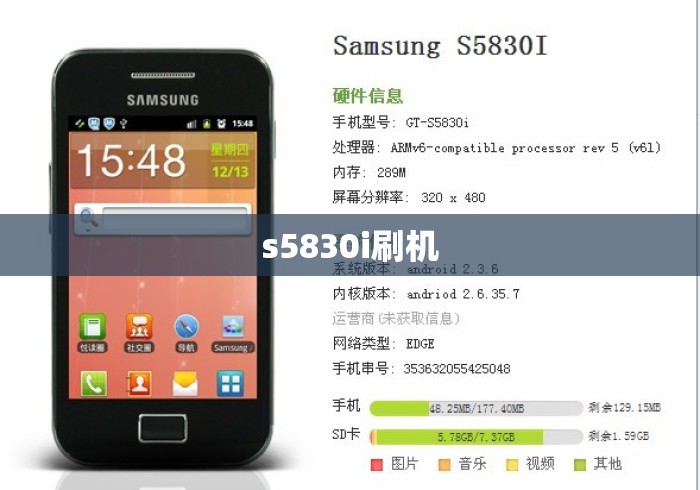
The Samsung Galaxy Ace GT-S5830i (often called the "Ace i") is an old Android 2.3 Gingerbread device with a Broadcom BCM21553 chipset — which is important because most "Galaxy Ace" (S5830) root guides do not work on the S5830i.
Root methods for GT-S5830i
Method 1: Pre-rooted kernel via Odin (most common)
- Install Samsung USB drivers on your PC.
- Download Odin (v1.85 or v3.x works fine).
- Download a pre-rooted kernel for S5830i (e.g., Rafael Baugis kernel or Hell Lock kernel) — these are the classic ones for this model. Files are usually
.tar or .tar.md5.
- Boot the phone into Download Mode: power off, then hold Volume Down + Home + Power.
- Connect via USB, open Odin, load the kernel in PDA/AP, ensure only "Auto Reboot" and "F. Reset Time" are checked.
- Flash. The phone reboots with root (Superuser app included).
Method 2: Universal Gingerbread root (zergRush / SuperOneClick)
- SuperOneClick or zergRush exploit-based tools sometimes work on S5830i Gingerbread firmware, but success varies by firmware build. Try this only if Method 1 files aren't available to you.
Method 3: Custom recovery + SuperSU zip
- Flash CWM recovery for S5830i via Odin, then flash SuperSU.zip from recovery. Works but you need a compatible CWM build for this exact model.
Important warnings
- Do NOT flash S5830 (non-i) kernels or ROMs — different chipset, will brick.
- S5830i is Broadcom, S5830 is Qualcomm — the "i" matters.
- Keep a copy of your stock firmware (from SamMobile/SamFirmware) so you can recover via Odin if something goes wrong.
- These files are ~10+ years old; many download links are dead. Check XDA Forums → Samsung Galaxy Ace S5830i section for mirrors.
- Rooting voids warranty and can brick the device if interrupted — flash on a stable PC/USB connection.
After rooting
- Install SuperSU or Magisk (older Magisk versions may work on Gingerbread, but SuperSU is safer here).
- You can then remove bloatware, use Titanium Backup, or flash custom Gingerbread/CM7-based ROMs built for S5830i.
Would you like links to specific XDA threads or help identifying your exact firmware build (Settings → About phone → Build number) so I can point you to the right kernel?


暂时没有评论,来抢沙发吧~